How long are Haugen Academy online courses?
Haugen Academy online courses take approximately 1 hour to 90 minutes to complete per CEU, depending on the topic and the learner’s experience level.
I took a free webinar. Where are my CEUs?
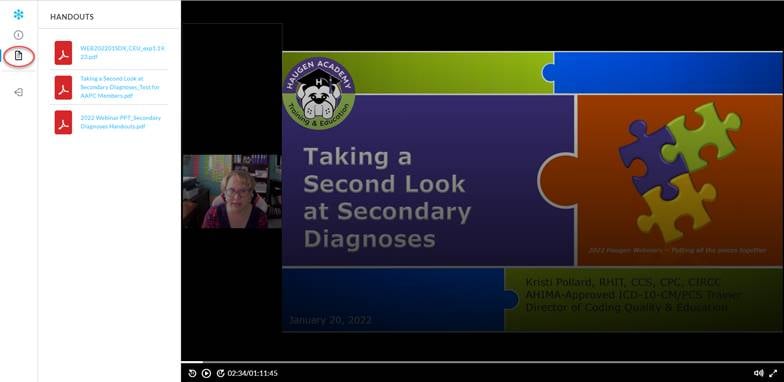
The CEUs are to the left of the video underneath the Handouts Icon. All participants are able to download/print their own CEU certificates.
Tips for Getting Started in Haugen Academy
We highly recommend that you review the Welcome to Haugen Academy course which is available within the Haugen Academy learning management system.
How do I get access to Haugen Academy?
After being enrolled or purchasing an online course, you will receive the Haugen Academy Registration Notification email from the Haugen Academy Administrator. Follow the instructions provided in the email to reset your password for your initial access. Be sure to check your junk/spam folder if you don’t see the Registration Notification email.
I’m in Haugen Academy, how do I find my courses?
The User Menu is in the upper left corner of Haugen Academy. From there, select My Courses and Learning Plans to see the courses and learning plans you are currently enrolled in.
How do I see what courses are available in Haugen Academy?
- Within Haugen Academy, check to see if you have the Course Catalog option available from the User Menu. If you have this access, you will see the catalogs available to you. Keep in mind that not all courses will be shown initially, to open the full catalog, click on the catalog name.
- A full listing of all Haugen Academy educational offerings is available in the Shop on our website at https://www.thehaugengroup.com/shop/
I am in a course, but I can’t advance to the next page even though I have completed the page. How do I continue the lesson?
- If you are not able to advance to the next page using the NEXT button on the current page, use the Table of Contents located in the menu at the top right of the course to advance.
- Our team does want to know if you get stuck on a page! Tell us about it using the Contact Us button in the course (top right menu). Or you can send email us at hahelp@thehaugengroup.com.
Our organization needs to be invoiced in order to register for online education. What’s the best way to request this?
If you need an invoice, send us an email at hahelp@thehaugengroup.com with your request. We will follow up within 2 business days. Once we receive payment, we will register you for the education.
How can I get my CEU certificate?
- When you successfully complete a course, you will be prompted to download your certificate.
- In addition, you will receive an email from Haugen Academy Administrator with a link to your certificate.
- And finally, you may find CEUs for In Haugen Academy by selecting My Activities from the User Menu, then navigating to Courses. From there you will see your course listing, look for the Certificate icon and print or save your certificate.
- IF YOU TOOK A FREE WEBINAR, READ THIS (Screenshot Below) The CEUs, handouts, and test for AAPC Members are to the left of the webinar video as shown below. If you do not see the handouts icon, ensure you are in Google Chrome.

I can’t find the CEU certificate for a course I finished, what happened?
To earn the certificate for the course, you must pass the Code Red Challenge or Course Assessment with a score of 80% or better. If you did not score 80% or better on the assessment, you can retake the test at your convenience – no need to take the entire course again. Just navigate to the assessment using the Table of Contents in the course.
What internet browser should I use to view the courses in Haugen Academy?
We recommend using the Google Chrome internet browser for the most reliable experience.
Why is it important that I clear my browser’s cache routinely and how do I do it?
When you view a course in Haugen Academy, the course may “cache” to improve load times and performance. When we update courses, you may not see the latest version if you view a “cached” version. If your browser cache is cleared, you know you’re seeing the latest version.
Visit https://www.refreshyourcache.com/en/home/ for steps on how to clear your cache!
When I return to a course I have previously been in, I’m not being prompted to resume where I left off, why?
When exiting a course, be sure to use the Exit Course button within the course rather than closing the browser window. Exiting at the course level keeps you logged into the learning management system allowing the system to successfully store your progress.
Is Haugen Academy education pre-approved for CEUs?
Yes! Haugen Academy education is pre-approved for AHIMA and/or AAPC CEUs. Haugen Academy is an AHIMA-Approved Continuing Education Provider Program (ACEP) provider.
- Detailed CEU information can be reviewed prior to purchase from the CE Credit tab of the product description in the Haugen Academy Shop.
- CEU information is also available as part of the course description in the Haugen Academy learning management system.
How can I retrieve my password?
On the Haugen Academy login page, select the Forgot your Password link. This will generate an email with instructions to guide you through resetting your password. If you’ve tried this but are still having issues, email us at hahelp@thehaugengroup.com.
What If I don’t remember my Username?
Your username will be provided in the initial registration email that you receive from hahelp@thehaugengroup.com. Please be sure to record your username for future reference. Your username is usually your email address, but if you have 2 accounts with us (i.e. education from your employer as well as education purchased from our website) you may have a secondary username. If you select “Forgot Password” at www.haugenacademy.com, you can enter your email address and the system will provide you with a notification containing your username.
How do I allow pop-ups for Haugen Academy?
This depends on your internet browser but is typically found in Settings under Privacy and security. Double check to make sure www.haugenacademy.com site is set to allow pop-ups.
What email address should I expect communication from?
Automatic notifications are sent from the Haugen Academy Administrator hahelp@thehaugengroup.com. You may need to verify this email address is on your safe sender list to avoid having emails go to your junk/spam folder.
How long are Haugen Academy webinars?
Haugen Academy webinars are approximately 1 hour. Our ICD-10-CM updates usually runs 1.5 hours depending on the volume of changes.
How long are Haugen Academy online courses?
Haugen Academy online courses take approximately 1 hour to 90 minutes to complete per CEU, depending on the topic and the learner’s experience level.
When will I receive access to my webinar?
If you purchased an on-demand webinar, you will receive an email with a link to access the recording within 1 business day. If you purchased a webinar with a future release date, you will receive an email on the date of release. View the product info for information on release dates.
How does a group webinar purchase work?
We offer a group rate to provider organizations (hospitals, health systems, or physician groups). Purchasing a webinar at the group rate enables group members to watch the webinar and earn CEUs. Upon purchasing an on-demand webinar, you will receive an email with a unique link that can then be forwarded to anyone within your healthcare facility for viewing. If you purchased a webinar with a future release date, you will receive an email to share with your facility on the date of release. View the product info for information on release dates.
My team is remote. How can I have more than one watch?
We offer different pricing options for groups!
- Provider Organization: The on-demand webinar may be shared with others within your provider organization (hospitals, health systems, or physician groups). You will receive an email from Haugen Webinars with a unique link to share with your team.
- Corporate Organization (Up to 150 Learners): The on-demand webinar may be shared with others within your corporation. You will receive an email from Haugen Webinars with a unique link to share with your team. If you have more than 150 learners, please Contact Us for pricing.
Upon purchasing an organization rate for an on-demand webinar, you will receive an email that can be forwarded to your team. This email includes a link that allows each team member to access the webinar, CEUs, and handouts at their convenience. If the webinar is upcoming, you will receive this notification on the date of release. View the product info for information on release dates.
Where are my CEUs?
The CEUs are to the left of the video underneath the Handouts Icon. All participants are able to download/print their own CEU certificates.
Can I print the slide deck for the webinar?
The handouts are located on the Handouts Tab to the left of the webinar recording along with the test for AAPC members and CEU certificates.
Our organization needs to be invoiced in order to register for online education. What’s the best way to request this?
If you need an invoice, send us an email at hahelp@thehaugengroup.com with your request. We will follow up within 2 business days. Once we receive payment, we will register you for the education.
Can I return an on-demand webinar that I have purchased?
On-demand webinars are only available for use by the individual (individual rate) or health care facility (group rate) that purchased the webinar. Please review the webinar description carefully before purchasing as refunds are not available. However, if you are unhappy with your purchase, please reach out to us for further assistance: hahelp@thehaugengroup.com.